
7 Easy Ways to Speed up Your Website
7 Easy Ways to Speed Up Your Website in 2026
A slow website can frustrate visitors, reduce engagement, and make it harder for customers to complete important actions. Whether you manage a WordPress website, Shopify store, or business website, improving loading performance is an important part of creating a better user experience.
If you’re wondering how to speed up your website, the good news is that many performance problems can be improved without completely rebuilding your site.
At ObeySoft, we focus on practical website optimization, technical SEO, and performance improvements that help businesses build faster, more accessible websites.
In this guide, discover seven easy ways to speed up your website, improve Core Web Vitals, and create a smoother browsing experience.
Why Is Website Speed Important for SEO?
Website speed affects how quickly visitors can access and interact with your content.
Google uses Core Web Vitals in its ranking systems, although good performance scores alone do not guarantee higher search rankings.
Faster websites can also improve navigation, reduce user frustration, and make important content easier to access.
The three Core Web Vitals are:
- Largest Contentful Paint (LCP): Measures how quickly the largest visible content element loads.
- Interaction to Next Paint (INP): Measures responsiveness to user interactions.
- Cumulative Layout Shift (CLS): Measures unexpected visual movement.
For good user experience, common recommended thresholds are LCP within 2.5 seconds, INP at or below 200 milliseconds, and CLS at or below 0.1, measured at the 75th percentile of page visits.
1. Optimize and Compress Website Images
Large images are a common reason websites load slowly.
High-resolution product photographs, homepage banners, and oversized background images can significantly increase page weight.
How to Optimize Images
- Compress images before uploading them.
- Use modern formats such as WebP or AVIF when appropriate.
- Resize images to match their actual display dimensions.
- Use responsive images for different screen sizes.
- Lazy-load images that appear below the visible area.
- Avoid lazy-loading important above-the-fold hero images.
Quick SEO Tip: Add accurate descriptive alt text to meaningful images. Alt text supports accessibility and helps search engines understand image content.
2. Enable Browser Caching and Page Caching
Caching allows browsers and servers to reuse content instead of downloading or generating everything again on each visit.
Ways to Improve Caching
- Configure appropriate browser cache headers.
- Enable page caching for suitable public pages.
- Cache static assets such as images, CSS, and JavaScript.
- Use a reliable WordPress caching solution.
- Exclude dynamic shopping cart, checkout, and account pages from inappropriate full-page caching.
For WordPress, caching solutions such as LiteSpeed Cache or WP Rocket may be suitable depending on your hosting environment.
Quick SEO Tip: Test your website after configuring caching to make sure menus, contact forms, shopping carts, and personalized elements still work correctly.
3. Use a Content Delivery Network (CDN)
A Content Delivery Network distributes cached website assets across servers in different geographical locations.
When users visit your website, a CDN can deliver eligible content from infrastructure closer to their location.
This can reduce network latency and improve performance, particularly for websites serving international audiences.
CDN Optimization Tips
- Choose a CDN compatible with your hosting setup.
- Cache static resources appropriately.
- Enable supported image and compression optimizations.
- Review cache-control policies.
- Measure performance before and after implementation.
Cloudflare is one option that offers CDN and website performance features.
Quick SEO Tip: A CDN is not a replacement for efficient hosting, properly optimized images, or a well-built website.
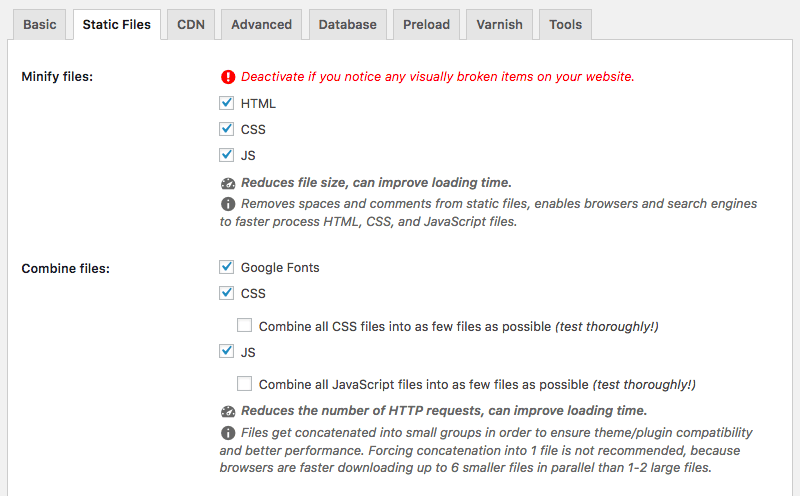
4. Minimize CSS and JavaScript
Large CSS and JavaScript files can delay rendering and make websites feel unresponsive.
Some themes, page builders, and plugins load resources that aren’t required on every page.
How to Reduce Unnecessary Code
- Remove unused plugins and scripts.
- Minify CSS and JavaScript where appropriate.
- Defer non-critical JavaScript.
- Reduce third-party tracking scripts.
- Prioritize critical page resources.
- Eliminate render-blocking resources where feasible.
Quick SEO Tip: Combining or delaying scripts without testing can break website functions. Always test important pages after applying optimizations.
5. Choose Reliable Hosting and Optimize Server Response
Your hosting environment affects how quickly a website responds to requests.
Overloaded servers, inefficient database queries, and outdated software can create delays before page content begins loading.
Hosting Performance Improvements
- Choose hosting appropriate for your traffic and website type.
- Use supported PHP versions on WordPress.
- Enable server-level caching where available.
- Keep website software updated.
- Review database performance.
- Monitor server response time and resource usage.
Quick SEO Tip: Investigate Time to First Byte (TTFB) to understand server-response delays, while remembering that TTFB is a diagnostic metric rather than a Core Web Vital.
6. Reduce Unnecessary Plugins and Redirects
Too many resource-heavy plugins can increase processing time and load unnecessary scripts.
Redirect chains can also introduce extra network requests before visitors reach the intended page.
Practical Optimization Steps
- Audit installed WordPress plugins.
- Remove unused extensions.
- Replace unnecessary plugin features with simpler solutions when appropriate.
- Fix broken internal links.
- Update internal links that point through redirects.
- Avoid unnecessary redirect chains.
- Test website functionality after removing plugins.
Quick SEO Tip: Plugin quality and behavior matter more than the total number of installed plugins. A well-coded plugin may have very little performance impact.
7. Monitor Website Speed and Core Web Vitals
Website optimization is an ongoing process.
Regular testing helps you understand whether new themes, scripts, images, plugins, or content changes are slowing your website down.
Recommended Website Speed Testing Tools
Google PageSpeed Insights
Check mobile and desktop performance, Core Web Vitals, and optimization opportunities.
Website: https://pagespeed.web.dev/
Google Search Console
Review Core Web Vitals reports to identify groups of pages with performance issues.
Website: https://search.google.com/search-console/
Chrome Lighthouse
Analyze page performance, accessibility, and technical improvement opportunities.
WebPageTest
Inspect loading behavior, network waterfalls, and individual resource performance.
Website: https://www.webpagetest.org/
Quick SEO Tip: Review real-user performance data where available. Lab test results are useful for troubleshooting, but a single test cannot describe every visitor’s experience.
How Can WordPress Website Owners Improve Loading Speed?
WordPress users should start by checking hosting performance, image sizes, caching configuration, and unnecessary third-party scripts.
A lightweight theme, efficient plugins, properly configured caching, and optimized images can provide a strong foundation.
Before installing multiple optimization plugins, check whether your hosting provider already offers similar features.
For Shopify stores, review installed apps, theme scripts, video assets, and product imagery. Shopify handles much of the underlying hosting infrastructure, so optimization options differ from self-hosted WordPress.
Website Speed Optimization for SEO, GEO and AEO
Technical performance supports access to useful online content.
Traditional Search Engine Optimization (SEO) considers crawlability, page experience, and content relevance.
Answer Engine Optimization (AEO) focuses on presenting clear answers to users’ questions.
Generative Engine Optimization (GEO) emphasizes accurate, well-structured, accessible information that AI-powered discovery systems can interpret.
Website speed alone does not guarantee visibility in Google AI Overviews, ChatGPT Search, Gemini, or Perplexity.
However, keeping important content accessible and creating a good user experience are sensible foundations for modern website optimization.
How to Know Whether Your Website Is Fast Enough
Start by reviewing your most important pages rather than relying on your homepage alone.
Test your homepage, key service pages, popular blog posts, and high-value product or category pages.
Prioritize improvements affecting real users, especially mobile visitors.
Look for recurring problems such as slow LCP, poor interaction responsiveness, unexpected layout shifts, and oversized images.
Measure results after each significant change so you can identify which improvements worked.
Final Thoughts
Learning how to speed up your website doesn’t have to be complicated.
Start with image optimization, caching, CDN configuration, efficient CSS and JavaScript, reliable hosting, plugin management, and regular performance monitoring.
Together, these steps can improve the browsing experience and strengthen your website’s technical SEO foundation.
Need Professional Website Speed Optimization?
At ObeySoft, we provide technical SEO audits, website optimization recommendations, WordPress SEO, and other search optimization services.