
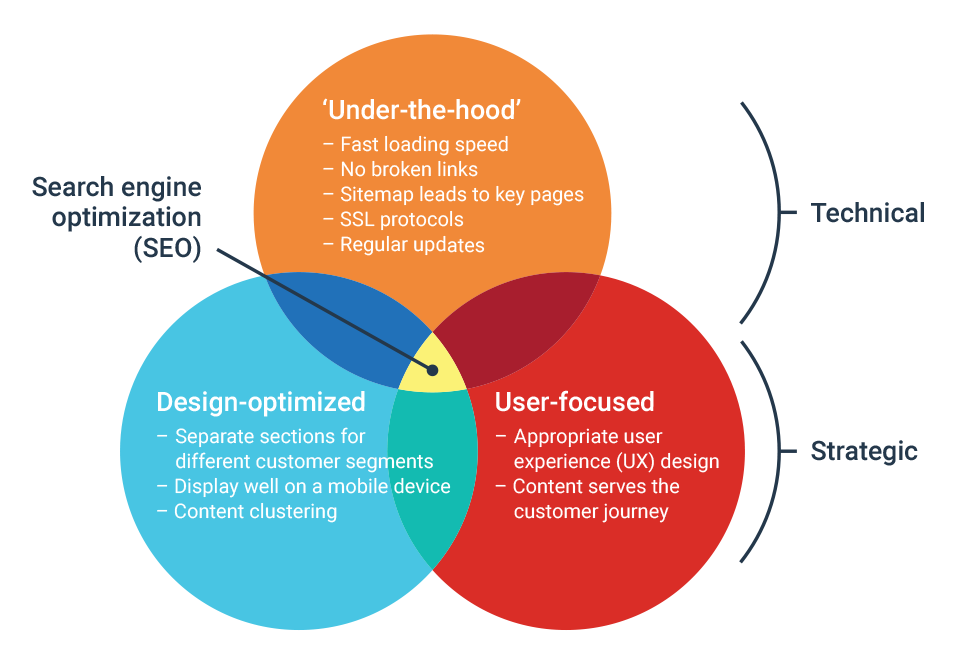
analyze your website
Analyze Your Website: Complete SEO Audit & Performance Guide
Want to analyze your website to discover SEO issues, improve loading speed, understand visitor behavior, and identify opportunities for better search visibility?
A comprehensive website analysis helps businesses evaluate technical performance, search engine accessibility, content quality, mobile usability, and overall user experience.
At ObeySoft, we focus on technical SEO, website audits, Answer Engine Optimization (AEO), and Generative Engine Optimization (GEO) to help businesses make informed decisions about their online presence.
Whether you manage a WordPress website, Shopify store, eCommerce business, or professional service website, this guide explains how to analyze your website using practical methods and reliable tools.
What Is Website Analysis?
Website analysis is the process of evaluating a website’s technical condition, search performance, content quality, usability, and ability to support business goals.
A website analysis may include:
- Technical SEO audit
- Website speed testing
- Google indexing review
- Keyword performance analysis
- Content quality assessment
- Internal and external link analysis
- Mobile usability testing
- Website security checks
- Competitor research
- Conversion and user experience analysis
The objective is not simply to generate an SEO score. It is to identify problems, prioritize useful improvements, and measure their effects.
1. Analyze Your Website’s SEO Performance
Start by reviewing how your website performs in organic search.
Google Search Console provides useful information about search queries, impressions, clicks, and indexing.
What to Check
- Important keywords generating impressions
- Pages receiving organic search clicks
- Search visibility changes over time
- Important pages excluded from indexing
- Duplicate or incorrect canonical URLs
- Search queries with relevant impressions but limited clicks
Compare meaningful time periods and investigate changes before drawing conclusions.
SEO Tip: Prioritize pages that already attract relevant search interest but could better satisfy visitor intent.
2. Check Website Speed and Core Web Vitals
Website loading performance affects how visitors experience your content.
Use Google PageSpeed Insights to assess mobile and desktop performance.
Important metrics include:
Largest Contentful Paint (LCP): Measures when the largest visible content element finishes rendering.
Interaction to Next Paint (INP): Evaluates responsiveness to user interactions.
Cumulative Layout Shift (CLS): Measures unexpected layout movement.
Common targets for good Core Web Vitals performance are:
- LCP: 2.5 seconds or less
- INP: 200 milliseconds or less
- CLS: 0.1 or less
These targets are evaluated using real-user data at the 75th percentile where sufficient data is available.
Common Website Speed Problems
- Oversized images
- Unnecessary JavaScript
- Render-blocking resources
- Poor caching configuration
- Slow server responses
- Excessive third-party scripts
SEO Tip: Optimize important pages using real-user performance data wherever possible, not just a single laboratory speed score.
3. Review Technical SEO and Indexing Issues
Technical SEO helps search engines discover, crawl, and understand your website.
Check the following:
- Robots.txt configuration
- XML sitemap accessibility
- Index and noindex directives
- Canonical tags
- Broken internal links
- Redirect chains
- HTTP response codes
- Mobile rendering
- Structured data errors
- Website architecture
A technically accessible website provides a stronger foundation for organic search performance.
However, technical fixes do not guarantee higher rankings if the content is not useful or relevant.
4. Analyze Website Content Quality
High-quality content should answer real questions and meet user expectations.
Review important pages to identify outdated information, unclear explanations, duplicated content, and missing details.
Questions to Ask
- Does the page answer the visitor’s main question?
- Is the information accurate and useful?
- Does the page demonstrate relevant knowledge?
- Is the content organized under clear headings?
- Are claims supported where necessary?
- Are important service details easy to understand?
- Does the page offer value beyond generic summaries?
Avoid rewriting useful content merely to increase keyword frequency.
SEO Tip: Improve content according to search intent, factual accuracy, and user needs.
5. Analyze Your Website’s Keywords and Rankings
Keyword analysis helps identify how customers discover your website.
Group queries according to their search intent:
- Informational: Users seeking explanations or instructions
- Navigational: Users looking for a specific website or brand
- Commercial: Users comparing products or service providers
- Transactional: Users preparing to make a purchase or enquiry
Keyword Research Tools
Google Search Console, Google Keyword Planner, Ahrefs, and Semrush can assist with keyword analysis.
Some advanced features require paid access.
SEO Tip: Target relevant topics instead of creating nearly identical pages for every minor keyword variation.
6. Check Mobile-Friendliness and User Experience
Mobile usability is essential for modern websites.
Review your site on different screen sizes and devices.
Look for:
- Readable fonts
- Responsive layouts
- Accessible navigation
- Adequately sized interactive controls
- Functional contact forms
- Proper image scaling
- Clear calls to action
- Accessible menus and links
Also evaluate whether visitors can easily find the products, services, and information they need.
7. Analyze Backlinks and Internal Links
Links help visitors and search engines discover related information.
Internal Linking Audit
Check whether important pages receive relevant links from other pages on your website.
Use descriptive anchor text and avoid creating unnecessarily complicated navigation paths.
Backlink Analysis
Review referring websites, link relevance, editorial quality, and potential spam-related issues.
A relevant link from a reputable industry resource may offer more value than numerous low-quality backlinks.
Avoid purchasing manipulative links or participating in link schemes intended to influence rankings.
8. Review Website Security and Technical Reliability
Website security and reliability matter for both visitors and business operations.
Check for:
- HTTPS configuration
- Expired certificates
- Outdated website software
- Broken forms
- Unexpected redirects
- Security warnings
- Unavailable pages
- Backup and recovery arrangements
For WordPress websites, keep the core software, themes, and plugins updated using a controlled maintenance process.
9. Analyze Your Website for AI Search, AEO and GEO
Modern website analysis should also consider how clearly your content communicates information to AI-powered discovery systems.
Answer Engine Optimization (AEO) emphasizes clear, direct answers to customer questions.
Generative Engine Optimization (GEO) focuses on accurate, understandable, and credible information that may be discovered and interpreted by AI-powered search experiences.
AI Search Optimization Checklist
- Use descriptive headings and clear explanations.
- Provide accurate definitions.
- Answer relevant customer questions.
- Maintain consistent brand information.
- Publish original, useful content.
- Link to credible supporting information where appropriate.
- Make important content accessible to crawlers.
- Use structured data that reflects actual page content.
No optimization technique guarantees mentions in ChatGPT Search, Google AI Overviews, Gemini, or Perplexity.
10. Analyze Your Website’s Conversion Performance
Search traffic is valuable when it helps visitors complete meaningful actions.
Review the user journey from landing page to enquiry, purchase, or another business objective.
Consider:
- Contact form usability
- WhatsApp or contact button visibility
- Checkout functionality
- Product information clarity
- Service page effectiveness
- Trust-building information
- Analytics and conversion tracking
A successful website analysis connects technical and content improvements to measurable business goals.
Best Tools to Analyze Your Website
Several tools can help website owners identify improvement opportunities.
Google Search Console
Useful for organic search performance, indexing, sitemap monitoring, and search queries.
Website: https://search.google.com/search-console/
Google PageSpeed Insights
Useful for page loading performance, Core Web Vitals, and diagnostic recommendations.
Website: https://pagespeed.web.dev/
Google Analytics
Helps website owners understand visitor activity and configured business events or conversions.
Website: https://analytics.google.com/
Google Lighthouse
Provides laboratory audits for performance, accessibility, SEO, and technical best practices.
Ahrefs and Semrush
Commercial SEO platforms that provide keyword research, competitive analysis, backlink research, and website auditing features.
Rank Math SEO
A WordPress SEO plugin that supports metadata management, XML sitemaps, schema settings, and other SEO configuration tasks.
How Often Should You Analyze Your Website?
Website analysis should be repeated according to the website’s importance, update frequency, and business needs.
For many businesses, a monthly review of organic search performance and a periodic technical audit can be a practical starting point.
Important changes such as a website redesign, platform migration, major plugin update, or significant traffic decline may justify additional testing.
How ObeySoft Can Help You Analyze Your Website
ObeySoft provides website SEO auditing and optimization services focused on helping businesses identify technical issues and search improvement opportunities.
Our SEO service areas include:
- Website SEO audits
- Technical SEO analysis
- Keyword research
- On-page SEO optimization
- Website speed assessment
- WordPress SEO
- Shopify SEO
- Internal linking improvements
- AEO and GEO recommendations
- Search performance reporting
Whether you operate a small business website, online store, or international service website, we can help you evaluate suitable SEO improvements.
Final Thoughts
To analyze your website effectively, examine more than its appearance or a single SEO score.
Review technical accessibility, search performance, page speed, content quality, backlinks, mobile usability, and conversion performance.
Use trustworthy tools and prioritize improvements according to their relevance and impact.
A structured website analysis can help you make better optimization decisions and build a stronger foundation for long-term online visibility.
Need a Professional Website SEO Audit?
Contact ObeySoft to discuss your website’s technical performance, SEO challenges, and optimization priorities.